
Peace of mind, on your phone
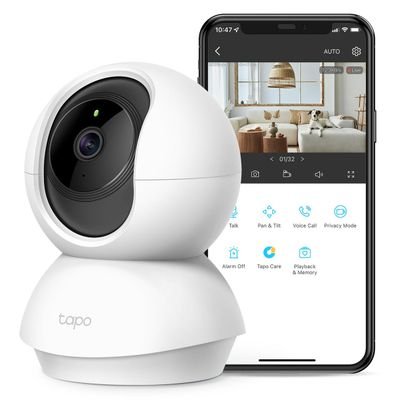
An indoor security camera lets you see and hear what is happening at home from anywhere, on your mobile phone. It is ideal for checking on your child or an elderly person, keeping an eye on pets, or simply knowing that everything is fine while you are out.
We can install your camera, or supply our own recommended Pan/Tilt 2K indoor security camera, the Tapo C210.
Our recommended camera: Tapo C210 Pan/Tilt 2K
- Sharp 2K picture, so faces and details are clear.
- Pan and tilt: turns 360° left and right and tilts up and down, so one camera can see the whole room. You move it from the app.
- Night vision, for a clear picture in the dark.
- Motion and person detection, with alerts sent straight to your phone.
- Two-way audio: listen, and talk through the camera to your child or relative.
- Privacy mode, to switch the camera off from the app whenever you want.
- Recording to a memory card: it can store video on a microSD card inside the camera (card not included).
What our on-site camera installation includes
1. Unpacking and choosing the right place
- We unpack the camera and check that it works.
- We help you choose the best position: a clear view of the room, near a power socket, within good Wi-Fi range, on a shelf or table, or fixed to the wall or ceiling with its mount.
- If you want recordings, we fit a microSD memory card in the camera and format it.
2. Connecting the camera to your Wi-Fi
- We connect the camera to your home Wi-Fi network. Like most home cameras, the Tapo C210 uses the 2.4 GHz Wi-Fi band, and we make sure your router provides it.
- We check the signal where the camera is placed, so the picture stays smooth and does not keep disconnecting. If your Wi-Fi does not reach, see our Wi-Fi coverage service.
3. Installing the app on your mobile phone, and Windows software
- We download the official Tapo app on your mobile phone (Android or iPhone) from Google Play or the App Store, and create or sign in to your Tapo account.
- We add the camera to the app and install the latest camera firmware.
- If you also want to watch the camera on your Windows computer, we install the manufacturer's Windows software where it is available.
- We can set up the app on the phones of other family members, so they can check in too.
4. Configuration
- We give the camera a name (for example "Living room" or "Grandma"), set the correct time and date, and set the picture quality.
- We set up motion and person detection, with the areas and sensitivity you want, and alerts on your phone.
- We set up recording to the memory card, night vision, and privacy mode.
- We protect your account with a strong password, and switch on two-step verification.
- We show you how to watch live, move the camera, talk through it and play back recordings.
5. Testing
- We test the live picture, pan and tilt, night vision, two-way audio and alerts from your phone, both at home on your Wi-Fi and on mobile data, so you know it works when you are out.
Privacy: please let visitors, carers and anyone working in your home know that a camera is in use.
Prices
- Visit & installation (you supply the camera): €100 for 1 camera, or €140 for 2 cameras (you supply 2 cameras).
- Visit & installation (we supply 1 camera): €150 for 1 camera, or €200 for 2 cameras (we supply 2 cameras).
We supply the Tapo C210 Pan/Tilt 2K indoor security camera.
We will come to your home and install your security camera. Request an on-site visit or see the price list (Gran Canaria).
On-site technical support service
An on-site technical support service provides clients with expert, hands-on assistance delivered directly at their physical location (home, office or business). This service is essential for complex issues that cannot be resolved remotely and require a technician to physically interact with the hardware, network or localized software environment.
At Computer Studio - ServTec.Info we provide an array of IT support and computer repair services. Whether you are looking for a trusted service provider, want to optimize your computer's performance, or wish to troubleshoot a specific issue, this guide will serve as a valuable resource.
Key offerings for the client
- Direct hardware repair & troubleshooting: diagnosing and fixing physical issues with computers, servers, printers and peripherals, including component replacement, cable management and internal maintenance.
- Network setup and configuration: installing, configuring and troubleshooting local area networks (LANs), Wi-Fi systems, routers and switches for secure and reliable connectivity.
- System installation & upgrades: performing complex installations of new operating systems, business software suites, or significant hardware upgrades that necessitate on-site presence and rigorous testing.
- Data backup and recovery: implementing and verifying local backup solutions or performing in-depth data recovery procedures on damaged drives or inaccessible systems.
- Personalized, hands-on training: tailored training sessions for employees or individuals on new equipment, software, or best practices within their actual working environment.
- Minimal downtime: by coming directly to the client, the service ensures a faster resolution for critical issues, significantly minimizing business disruption compared to off-site repair logistics.
This service offers convenience, rapid resolution and confidence that complex technical problems are being handled by qualified professionals directly where the technology resides. We specialize in virus, malware and spyware removal to restore your system's speed and security, and implement strong protection measures to prevent future infections and data loss. We also carry out memory upgrades and SSD replacements to speed up Windows booting, program loading, document scrolling and games.