
Strong Wi-Fi in every room
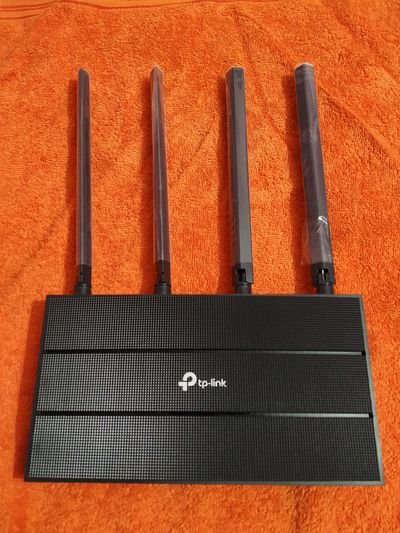

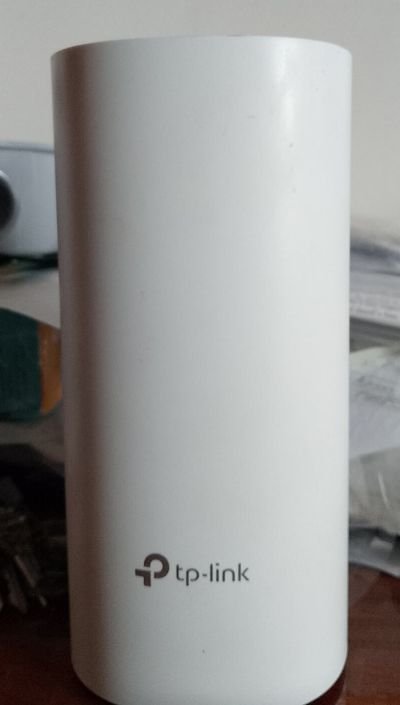

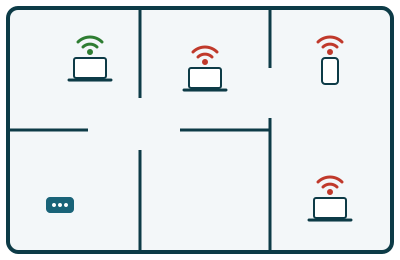
Most Wi-Fi problems are not caused by your internet connection, but by how the Wi-Fi reaches the rest of the building. The router supplied by your internet provider is often tucked away in a corner by the front door, and the signal has to fight its way through thick concrete and block walls, floors and furniture. The result is familiar:
- Dead zones: no signal, or only one bar, in bedrooms, the terrace or upstairs.
- Slow speeds far from the router, even though you pay for fast fibre.
- Dropouts: video calls freeze, TV streaming buffers, and devices keep disconnecting.
- Too many devices: phones, tablets, laptops, smart TVs and cameras all competing for one router.
Why mesh Wi-Fi solves it
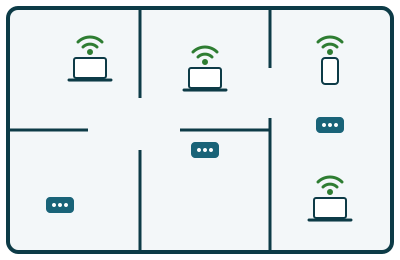
A mesh Wi-Fi system uses a main router plus one or more mesh units placed around the building. The units talk to each other and pass the signal on, so the whole home or office is covered by one Wi-Fi network with one name and one password. Your phone and laptop connect automatically to the strongest unit as you move from room to room.
The TP-Link AC1200 mesh Wi-Fi router is dual-band: 2.4 GHz for range and walls, and 5 GHz for speed, with up to 1200 Mbps of combined Wi-Fi speed (300 Mbps + 867 Mbps). Coverage can be extended later simply by adding another compatible mesh unit.
What our on-site Wi-Fi installation includes
1. Wi-Fi survey and planning
- We check the signal in each room and find the dead zones.
- We choose the best places for the router and mesh units: central, raised off the floor, and away from thick walls, metal and microwaves.
2. Unpacking and connecting
- We unpack the router and mesh units and connect the main unit to your internet provider's fibre or ADSL router with a network cable.
- We power up and position the mesh units, and make sure every unit has a strong link back to the main router.
3. Configuring the router and Wi-Fi options
- We set up the router with the manufacturer's app or web page, and install the latest firmware.
- We replace the default admin password and create your Wi-Fi network name and a strong password, with modern WPA2/WPA3 security.
- We set up both Wi-Fi bands, so each device automatically uses the fastest band available.
- We make sure the new router works smoothly with your internet provider's router, without conflicts that slow your connection down.
- On request: a separate guest Wi-Fi network for visitors or customers, and parental controls for children's devices.
4. Installing Windows Wi-Fi drivers
- We update the Wi-Fi adapter drivers on your Windows desktop computers and laptops, only from the manufacturer's official website, so they connect at full speed and stay connected.
- We check that older computers can use the faster 5 GHz band, and advise you if one needs a better Wi-Fi adapter.
5. Connecting and testing all your devices
- We connect and test your desktop computers, laptops, tablets and mobile phones, plus smart TVs, printers and other Wi-Fi devices.
- We remove the old Wi-Fi networks from your devices, so they do not keep connecting to the old, weak router.
- We run a speed test in each room and walk around the building with a phone, to confirm that the connection stays strong and switches smoothly between the mesh units.
- We leave you a card with your Wi-Fi network name and password.
Price
TP-Link AC1200 mesh Wi-Fi router (or similar), supplied and installed: €140, including installation and the on-site visit.
IF extra mesh units are required or a Gigabit ethernet repeater required, please request a price quotation at the time.
We will come to your home or business and fix your Wi-Fi. Request an on-site home visit, request on-site business IT support, or see the price list (Gran Canaria).
On-site technical support service
An on-site technical support service provides clients with expert, hands-on assistance delivered directly at their physical location (home, office or business). This service is essential for complex issues that cannot be resolved remotely and require a technician to physically interact with the hardware, network or localized software environment.
At Computer Studio - ServTec.Info we provide an array of IT support and computer repair services. Whether you are looking for a trusted service provider, want to optimize your computer's performance, or wish to troubleshoot a specific issue, this guide will serve as a valuable resource.
Key offerings for the client
- Direct hardware repair & troubleshooting: diagnosing and fixing physical issues with computers, servers, printers and peripherals, including component replacement, cable management and internal maintenance.
- Network setup and configuration: installing, configuring and troubleshooting local area networks (LANs), Wi-Fi systems, routers and switches for secure and reliable connectivity.
- System installation & upgrades: performing complex installations of new operating systems, business software suites, or significant hardware upgrades that necessitate on-site presence and rigorous testing.
- Data backup and recovery: implementing and verifying local backup solutions or performing in-depth data recovery procedures on damaged drives or inaccessible systems.
- Personalized, hands-on training: tailored training sessions for employees or individuals on new equipment, software, or best practices within their actual working environment.
- Minimal downtime: by coming directly to the client, the service ensures a faster resolution for critical issues, significantly minimizing business disruption compared to off-site repair logistics.
This service offers convenience, rapid resolution and confidence that complex technical problems are being handled by qualified professionals directly where the technology resides. We specialize in virus, malware and spyware removal to restore your system's speed and security, and implement strong protection measures to prevent future infections and data loss. We also carry out memory upgrades and SSD replacements to speed up Windows booting, program loading, document scrolling and games.