Web design and internet services we offer
- Website design (new site)
- Web re-design (revamp old site)
- Web hosting (shared & own server options)
- Internet business card / CV
- Internet domain names
- Domain search
- Domain register
- Domain transfer
- Domain name services
- Virtual "business card"
- Business website
- E-commerce web shop
Ready to start? Request web design or internet services and tell us what you need, or call us on (+34) 613-996-905.
What are internet services?
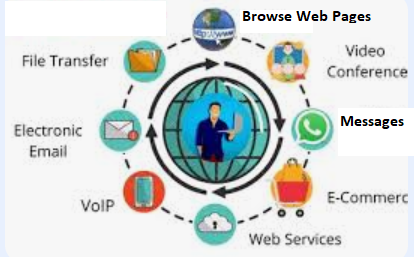
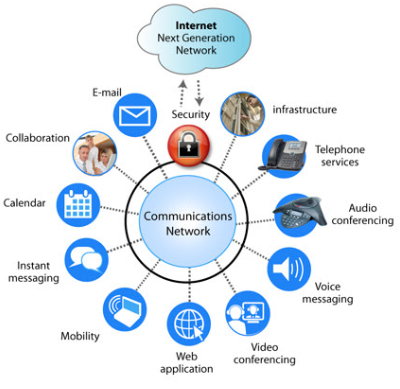
Let's break down what "internet services" are in a clear and comprehensive way.
A simple definition
At its core, internet services are the various applications, platforms, and tools that are delivered over the internet and enable users to communicate, access information, and perform tasks.
Think of the internet as a giant global network of roads (the infrastructure). Internet services are the different types of vehicles and delivery trucks that use those roads to bring you what you need, like a postal service (email), a library (the web), or a phone company (VoIP).
The core infrastructure: how services are delivered
Most internet services are built on a client-server model:
- Client: this is the software on your device (your web browser, email app, or game client) that requests information.
- Server: this is a powerful computer, always on and connected to the internet, that stores information and responds to client requests.
When you use a service, your client device communicates with a server to send and receive data.
Common categories of internet services
Here are the most common and essential types of internet services, categorized by their primary function.
1. Communication services
These services allow people to exchange information in real time or asynchronously.
- Email: the digital equivalent of postal mail (e.g., Gmail, Outlook, Yahoo Mail).
- Instant messaging (IM) and chat: real-time text-based communication (e.g., WhatsApp, Telegram, Slack).
- VoIP (Voice over IP): making voice and video calls over the internet (e.g., Zoom, Skype, Meet, WhatsApp calls).
- Forums and social media: platforms for group discussions and social interaction (e.g., Reddit, Facebook, Instagram, X/Twitter).
2. Information retrieval services
These services are used to find and access data stored on servers worldwide.
- World Wide Web (WWW): the most common service. It is a vast collection of interlinked documents (web pages) accessed via a browser (e.g., Chrome, Firefox, Opera) using HTTP/HTTPS. This includes everything from news sites to Wikipedia.
- File Transfer Protocol (FTP): a standard network protocol used to transfer computer files between a client and a server on a network. It is often used for uploading files to a website.
3. Management and remote access services
These services allow users to control and manage computers or networks from a distance.
- Remote desktop: allows you to connect to and use another computer as if you were sitting in front of it (e.g., Windows Remote Desktop, AnyViewer, TeamViewer).
- Telnet and SSH: protocols used to log in and execute commands on a remote computer (SSH is the more secure, modern standard).
4. Collaborative services (the modern workspace)
These are often cloud-based services that enable teams to work together.
- Cloud storage and file sharing: storing files online and sharing them with others (e.g., Google Drive, Dropbox, OneDrive).
- Project management tools: platforms for organizing tasks, deadlines, and team collaboration (e.g., Asana, Trello, Basecamp).
- Collaborative documents: tools that let multiple people edit documents, spreadsheets, and presentations simultaneously (e.g., Google Workspace, Microsoft 365).
5. Entertainment services
These services are for leisure and media consumption.
- Streaming media: on-demand audio and video (e.g., Netflix, Spotify, YouTube).
- Online gaming: playing video games over the internet, either with others or on remote servers (e.g., MMORPGs, Steam, Epic, Shadow, Xbox Live, cloud gaming services like NVIDIA GeForce Now), and titles such as Counter-Strike 2, Minecraft, Fortnite, Roblox, League of Legends, and Call of Duty (Warzone and other titles).
6. Commercial and transactional services
These form the backbone of the digital economy.
- E-commerce: buying and selling goods online (e.g., Amazon, eBay, Alibaba Group and Temu).
- Online banking and FinTech: managing finances, making payments, and trading stocks online (e.g., Robinhood, Nubank, Revolut, Ant Group, Chime, Klarna, Plaid, Checkout.com, Coinbase, bank apps, PayPal).
- Software as a Service (SaaS): subscribing to and using software over the internet instead of buying and installing it (e.g., Salesforce and HubSpot (CRM), Google Workspace (productivity), Canva (graphic design), Zoom (communication), Adobe Creative Cloud, Mailchimp).
The underlying protocols: the "rules of the road"
For these services to work, they rely on standardized rules called protocols. Each major service uses a specific protocol:
- Web browsing: HTTP (Hypertext Transfer Protocol) and HTTPS (the secure version).
- Email: SMTP (for sending), POP3/IMAP (for receiving).
- File transfer: FTP (File Transfer Protocol).
- Remote access: SSH (Secure Shell).
- Voice/video calls: SIP (Session Initiation Protocol), RTP (Real-time Transport Protocol).
Summary
In essence, internet services are the practical, user-facing applications that make the internet useful. They transform the raw connectivity of the internet into powerful tools for communication, information, collaboration, business, and entertainment that have become integral to modern life.
This is just an overview of internet services and what we can offer. If you would like to discuss your specific needs, please feel free to contact us. On our Home IT and Business IT menus there are questionnaires for you to complete beforehand, so that we are better informed about your needs. We also offer computer consultancy to better help you.
On-site technical support service
An on-site technical support service provides clients with expert, hands-on assistance delivered directly at their physical location (home, office or business). This service is essential for complex issues that cannot be resolved remotely and require a technician to physically interact with the hardware, network or localized software environment.
At Computer Studio - ServTec.Info we provide an array of IT support and computer repair services. Whether you are looking for a trusted service provider, want to optimize your computer's performance, or wish to troubleshoot a specific issue, this guide will serve as a valuable resource.
Key offerings for the client
- Direct hardware repair & troubleshooting: diagnosing and fixing physical issues with computers, servers, printers and peripherals, including component replacement, cable management and internal maintenance.
- Network setup and configuration: installing, configuring and troubleshooting local area networks (LANs), Wi-Fi systems, routers and switches for secure and reliable connectivity.
- System installation & upgrades: performing complex installations of new operating systems, business software suites, or significant hardware upgrades that necessitate on-site presence and rigorous testing.
- Data backup and recovery: implementing and verifying local backup solutions or performing in-depth data recovery procedures on damaged drives or inaccessible systems.
- Personalized, hands-on training: tailored training sessions for employees or individuals on new equipment, software, or best practices within their actual working environment.
- Minimal downtime: by coming directly to the client, the service ensures a faster resolution for critical issues, significantly minimizing business disruption compared to off-site repair logistics.
This service offers convenience, rapid resolution and confidence that complex technical problems are being handled by qualified professionals directly where the technology resides. We specialize in virus, malware and spyware removal to restore your system's speed and security, and implement strong protection measures to prevent future infections and data loss. We also carry out memory upgrades and SSD replacements to speed up Windows booting, program loading, document scrolling and games.