
Are you worried that your technology is falling victim to viruses, malware, and spyware?
Do you feel like your computer security and network security are under attack? Our virus removal services can help.
Virus removal service. We provide full virus detection and removal services. If you suspect that you have been infected by a virus, please contact us right away at (+34) 613-996-905. We can help. Our virus removal service offers on-site computer virus removal that completely eradicates even hard-to-remove computer virus infections.
We will come to your home and provide an on-site service that quickly identifies, removes and protects against viruses, malware, spyware and other malicious cyber threats. We use the latest cutting-edge technology to make sure our clients are protected from the ever-evolving world of cybercrime.
Computer Studio's experienced technicians can detect, remove, and protect against any virus, malware or spyware. Our detailed approach means we consider all possibilities, ensuring that your data can be backed up safely and quickly restored if needed. We clean and remove virus infections from desktop PCs, laptops, personal and business computers and servers. We service popular brands such as Compaq, NEC, Toshiba, Alienware, Dell, eMachines, Gateway, HP Hewlett Packard, IBM Lenovo, Acer and Sony to name a few. We can also provide extensive additional protection so that your device will not become an easy target again anytime soon.
A virus can do dangerous things to a laptop or desktop computer. Viruses can slow down a PC, crash it, or corrupt operating system files. Many spam messages, malware and viruses exploit security bugs in system or application software to spread. Viruses and malware can be extremely harmful, exposing your personal information to cyber criminals, encrypting files for ransom, or corrupting your images, Word and Excel documents and other important files. Our virus removal team tracks down hidden malware and spyware working silently in the background of your PC. Viruses transmit information stored on your laptop or desktop to hackers and unsafe hands.
Even if you have antivirus software on your PC, it can still become infected. If the antivirus software is not up to date it will no longer protect your PC from new viruses; an out-of-date virus checker offers no protection against the average three new viruses released daily. In many cases the antivirus is up to date yet not active or not scheduled to run, so protection is no longer enabled. Many types of "virus-like" software such as spyware, adware and rootkits are not cleaned by antivirus packages without a separate add-on. If your PC is infected, many users would not even realise it. Once a virus or spyware has thoroughly infected a computer it may require manual removal and, in severe cases, a reinstall of the operating system. It is very important to find and remove them as soon as possible. Computer Studio's expert technician will go to your home or office to clean and protect your PC. Customers can request same-day computer virus help.
Computer Studio strongly recommends you run a "deep antivirus scan" twice a month and make sure your antivirus is up to date. If your laptop or desktop PC is working slowly, takes forever to boot up, freezes, crashes or shows a blue screen, do not compromise your privacy: get it fixed as soon as possible. We all know how dangerous an infected laptop or PC can be for your data, banking details and passwords.
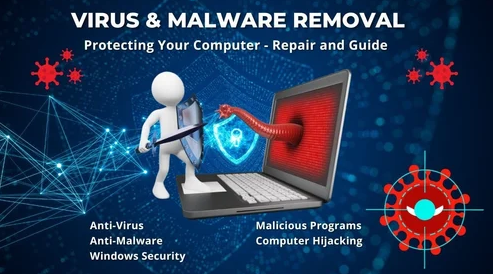
Computer Studio has the latest virus/spyware cleaning and repair tools that can identify and remove the most vicious and complex viruses, trojans, worms, rootkits and spyware from your computer system. We have many software tools that can detect and remove a wide range of threats. Examples include Malwarebytes Free, Avast's free antivirus, and the Windows Malicious Software Removal Tool (mrt.exe). Contact us today to experience professional service.
We also have a range of specialized tools like ADW Cleaner for adware, or ESET's online scanner to find and remove threats. Windows includes tools like Microsoft Defender Offline for removing persistent malware that might evade regular antivirus programs. We have created bootable rescue disks for very stubborn infections: a bootable USB drive with a tool like Kaspersky Rescue Disk can scan and clean the system before Windows even loads.
List of virus removal services
- Remove computer virus infections
- Remove virus worms
- Remove trojan viruses
- Virus scanning service
- Virus protection solution
- PC virus software solutions
- Virus adware removal
- Computer virus protection
- Virus infection removals
- Malware infection removals
- Computer malware protection
- Virus spyware removal
What is malware and what does it do?
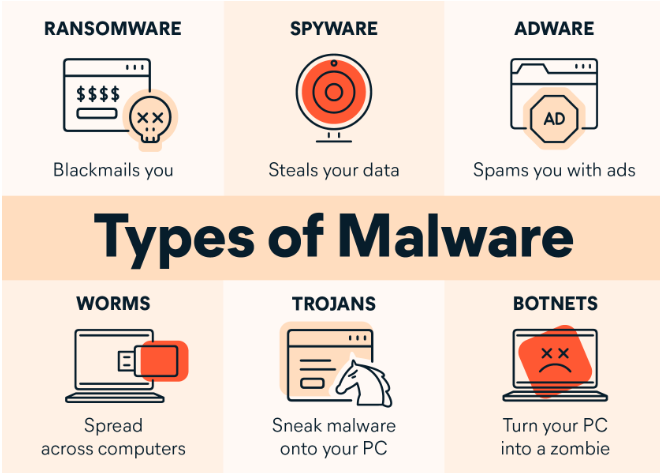
Malware is a type of malicious software that disrupts, damages, or gains unauthorized access to computer systems and data. It is used to steal sensitive information like banking details and personal data, corrupt or delete files, or demand ransom by holding data hostage (ransomware). Common types include viruses, worms, trojans, and spyware.
Malware infects computer systems to damage files or gain access to critical infrastructure. Ransomware is the most confrontational and direct form of malware. While other malware types operate undetected, ransomware makes its presence known immediately, demanding payment in exchange for returning access to your device or files.
In many cases malware may be difficult to detect, toiling quietly behind the scenes. Some malware wipes important data from infected machines; with no fraud or theft committed, the hacker's sole reward is the frustration and setbacks experienced by their victims. For example: 3,000 YouTube videos exposed as malware traps in a massive "Ghost Network" operation.
Other instances of malware have more serious consequences. Machines infected with these types of malware capture the user's personal or financial information, then forward it to a hacker who uses it for financial fraud or identity theft. At this stage, simply removing the malware is insufficient to remedy these offenses. Because malware relies on the processing power of the infected device, victims often experience significant performance issues: an overheating computer or a sudden slowdown can be a symptom of a malware infection.
Can PCs connected to the internet get malware? The internet is awash with PC malware such as WannaCry ransomware, and new zero-day vulnerabilities are being discovered and exploited all the time. Unfortunately, Windows Defender is not enough to protect you from the full range of malware and other online threats.
Malware removal. We understand that technology can be troublesome, especially regarding malware. That is why our technicians will take the time to explain all the steps they are going through during the removal process, so that you can better understand how the process works and what measures are being taken for prevention.
What is cryptoware, and what does it do?
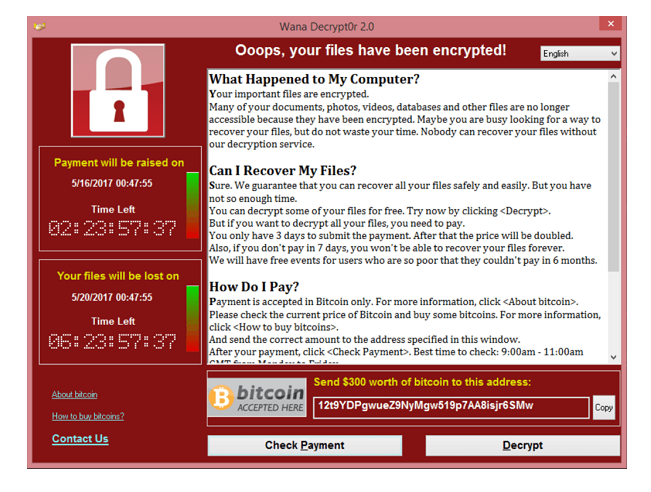
Cryptoware, also known as crypto-ransomware, is a type of malware that encrypts a victim's files, making them inaccessible until a ransom is paid to receive the decryption key. It is the most common form of ransomware and is often distributed through malicious email attachments or exploits, with attackers demanding payment, typically in cryptocurrency, for the key to restore access to the data.
Cryptoware: how it works
- Infection: cryptoware often infects a system through a phishing email attachment, a link to a malicious website, or by exploiting software vulnerabilities.
- Encryption: once active, the malware encrypts the victim's files, making them unreadable.
- Ransom demand: a pop-up message appears demanding payment (usually cryptocurrency) for the decryption key.
- Data loss: without the key, the victim cannot access their files. Paying the ransom does not guarantee the data will be returned, and it may encourage future attacks.
Cryptoware removal. If you find your data or stored information has been encrypted, and a message appears asking for ransom (money, bitcoin or PayPal) to restore, release or recover your laptop or computer: never pay for it. Even if you pay the ransom you will rarely get your files or computer back. The PC will need a complete Windows re-installation. In any case, the data may or may not be recoverable.
Experienced security analysts. Our dedicated researchers monitor active malware campaigns. With a trained team of analysts, we aim to provide the best malware removal service.
Who or what does cryptoware target? Hackers behind the cryptovirus go after vulnerable devices using Remote Desktop Services, a component of Windows that allows users to remotely access another device as well as Windows applications. Publicly exposed systems or those with weak password protection are particularly at risk. Ransomware operators go after a device regardless of whether it is in a home or office environment. Many blogs mention victims who found their home network, external drives and desktop all compromised. Often the user left Remote Desktop Services running, allowing the PC to be accessed remotely; password-protected remote access was not enough to keep the attacker out, and although the victim had backup devices, there was not a recent enough backup to replace the damage.
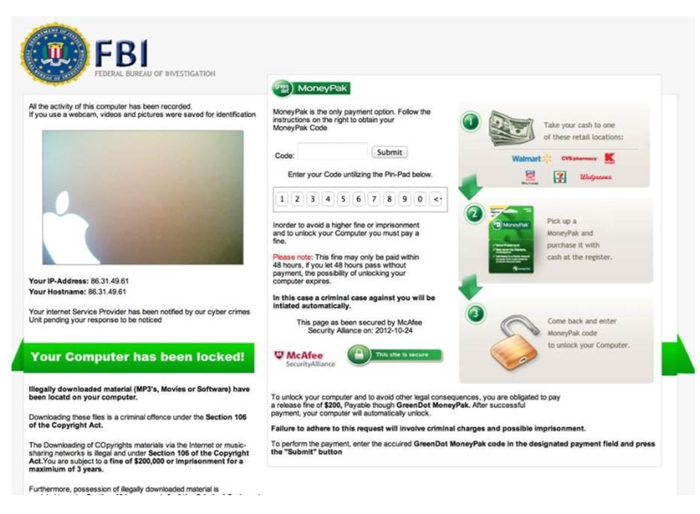
What does a cybercriminal do once they have broken into a system? After a cryptoware operator gains access to a device or network, the attacker stops multiple processes and services linked to database servers and MS Office applications, reducing the chances of built-in security interfering with the breach. They also delete event logs and shadow copies on the system, preventing the victim from seeing changes made and from restoring from backups. In addition, the attacker executes code to disable Data Execution Prevention, the security feature that protects your system from viruses and other threats, allowing the cryptovirus (such as the Locky virus) to run its malicious code and encrypt files and data. When the virus finishes encrypting the device, a ransom note automatically displays with warnings and a request for payment, typically in cryptocurrency. Normally the cybercriminal will not unlock your data in any case; all they want is for you to pay the ransom.
Important! How to protect against cryptoware
- Backups: regularly back up your data and keep backups offline, so they are not accessible to the malware if your network is compromised.
- Security software: install and regularly update reputable antivirus and anti-malware software.
- User awareness: be cautious of suspicious emails, attachments and links. Do not download files from unknown or untrustworthy websites.
- System updates: keep your operating system and all software up to date to patch vulnerabilities that attackers could exploit.
What spyware does
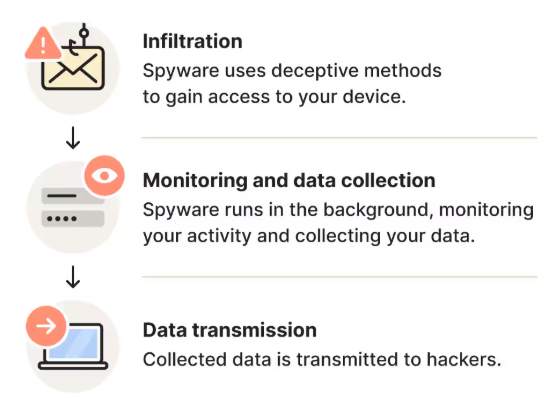
Spyware secretly monitors your activity and collects personal information, like login credentials, browsing habits and financial data, without your consent. It then transmits this data to a third party, which can lead to identity theft, financial fraud, or unwanted targeted advertising.
- Monitors user activity: it can track your browsing history, what you type (keystrokes), search history and online purchases.
- Sends data to attackers: the collected information is sent to online attackers, advertisers or data collection firms for profit or other malicious purposes.
- Hijacks your device: some spyware can change your browser settings, redirect your traffic or display intrusive pop-up ads.
- Can steal files: in some cases it can steal files from your computer or mobile device.
- Uses phone features: on mobile devices, spyware can monitor calls, intercept text messages, track your GPS location, and even use the camera and microphone to record audio and video.
How spyware secretly infiltrates your computer or laptop

These are some of the main methods of spyware infiltration to be aware of:
- Opening phishing emails: phishing scams may trick you into clicking malicious links or downloading infected files.
- Network vulnerabilities: criminals can take advantage of unpatched software flaws to silently install spyware.
- Visiting spoofed websites: spoofed websites designed to look like the site they impersonate may trick you into clicking an infected link.
- Visiting malicious websites: visiting compromised or malicious websites can trigger spyware to install automatically.
- Downloading free or bundled software: spyware hides inside free or seemingly harmless software to sneak onto your device when you install it.
- Clicking suspicious ads: malicious ads can infect your device with spyware if you click them, or sometimes even if you don't.
- Downloading fake apps: malicious apps often mimic legitimate ones to trick users into downloading spyware. Once installed they can monitor activity, steal data, or grant attackers remote device access.
- Downloading harmful software: hackers may exploit vulnerabilities to create hidden entry points in software, letting them bypass normal security protocols and install spyware without the user's knowledge.
On-site technical support service
An on-site technical support service provides clients with expert, hands-on assistance delivered directly at their physical location (home, office or business). This service is essential for complex issues that cannot be resolved remotely and require a technician to physically interact with the hardware, network or localized software environment.
At Computer Studio - ServTec.Info we provide an array of IT support and computer repair services. Whether you are looking for a trusted service provider, want to optimize your computer's performance, or wish to troubleshoot a specific issue, this guide will serve as a valuable resource.
Key offerings for the client
- Direct hardware repair & troubleshooting: diagnosing and fixing physical issues with computers, servers, printers and peripherals, including component replacement, cable management and internal maintenance.
- Network setup and configuration: installing, configuring and troubleshooting local area networks (LANs), Wi-Fi systems, routers and switches for secure and reliable connectivity.
- System installation & upgrades: performing complex installations of new operating systems, business software suites, or significant hardware upgrades that necessitate on-site presence and rigorous testing.
- Data backup and recovery: implementing and verifying local backup solutions or performing in-depth data recovery procedures on damaged drives or inaccessible systems.
- Personalized, hands-on training: tailored training sessions for employees or individuals on new equipment, software, or best practices within their actual working environment.
- Minimal downtime: by coming directly to the client, the service ensures a faster resolution for critical issues, significantly minimizing business disruption compared to off-site repair logistics.
This service offers convenience, rapid resolution and confidence that complex technical problems are being handled by qualified professionals directly where the technology resides. We specialize in virus, malware and spyware removal to restore your system's speed and security, and implement strong protection measures to prevent future infections and data loss. We also carry out memory upgrades and SSD replacements to speed up Windows booting, program loading, document scrolling and games.